How recipients consent
ViYomi by APP4EVERYONE · viyomi@app4everyone.com
ViYomi sends one kind of SMS: a notice to a family that an elderly parent has not made their daily check-in. The recipients are the parent's own children and close relatives, one to five people. Their consent is given verbally, to the family member who sets up the app on the parent's phone, before their number is entered. This page gives the exact script, where the app shows it, the confirmation text that follows, how consent is recorded, and how a recipient stops the messages.
1. The verbal consent script
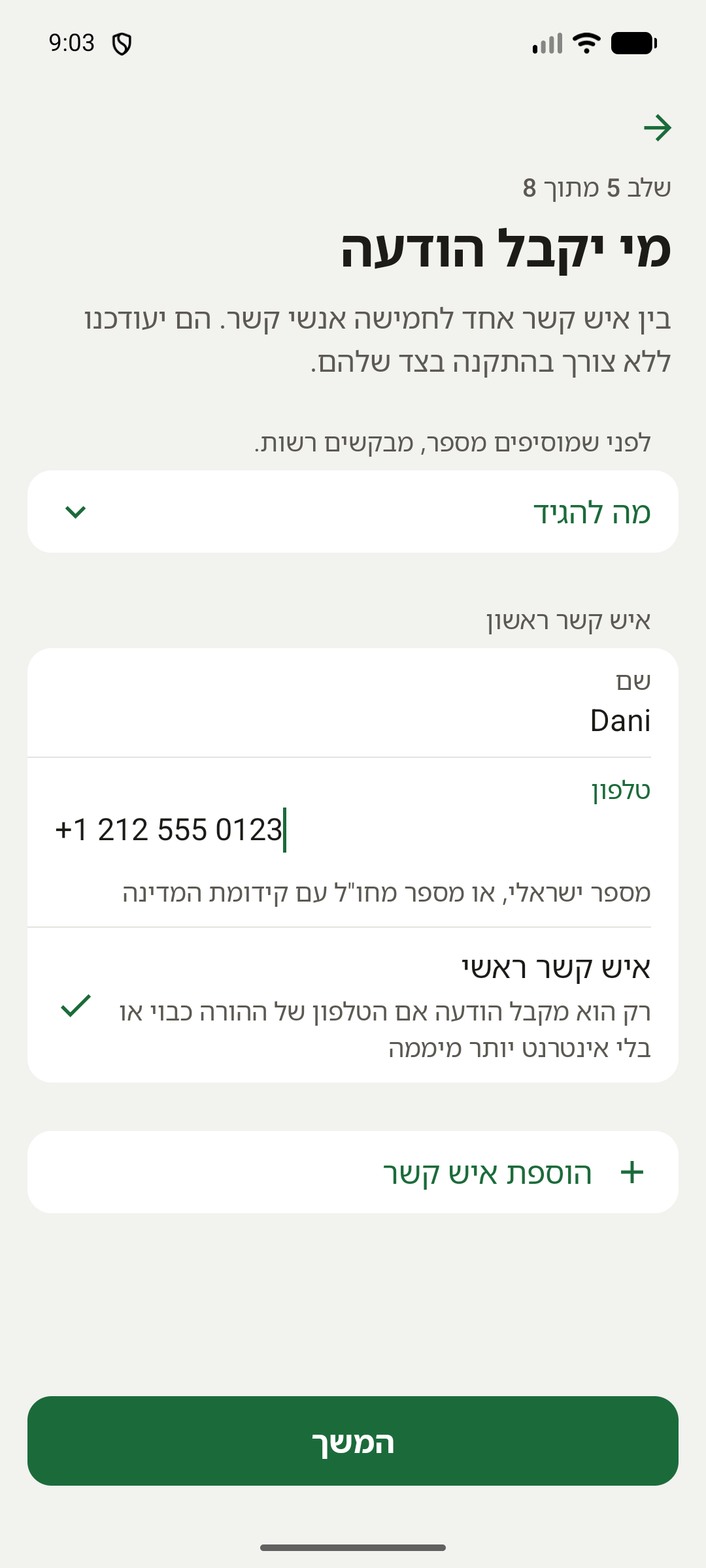
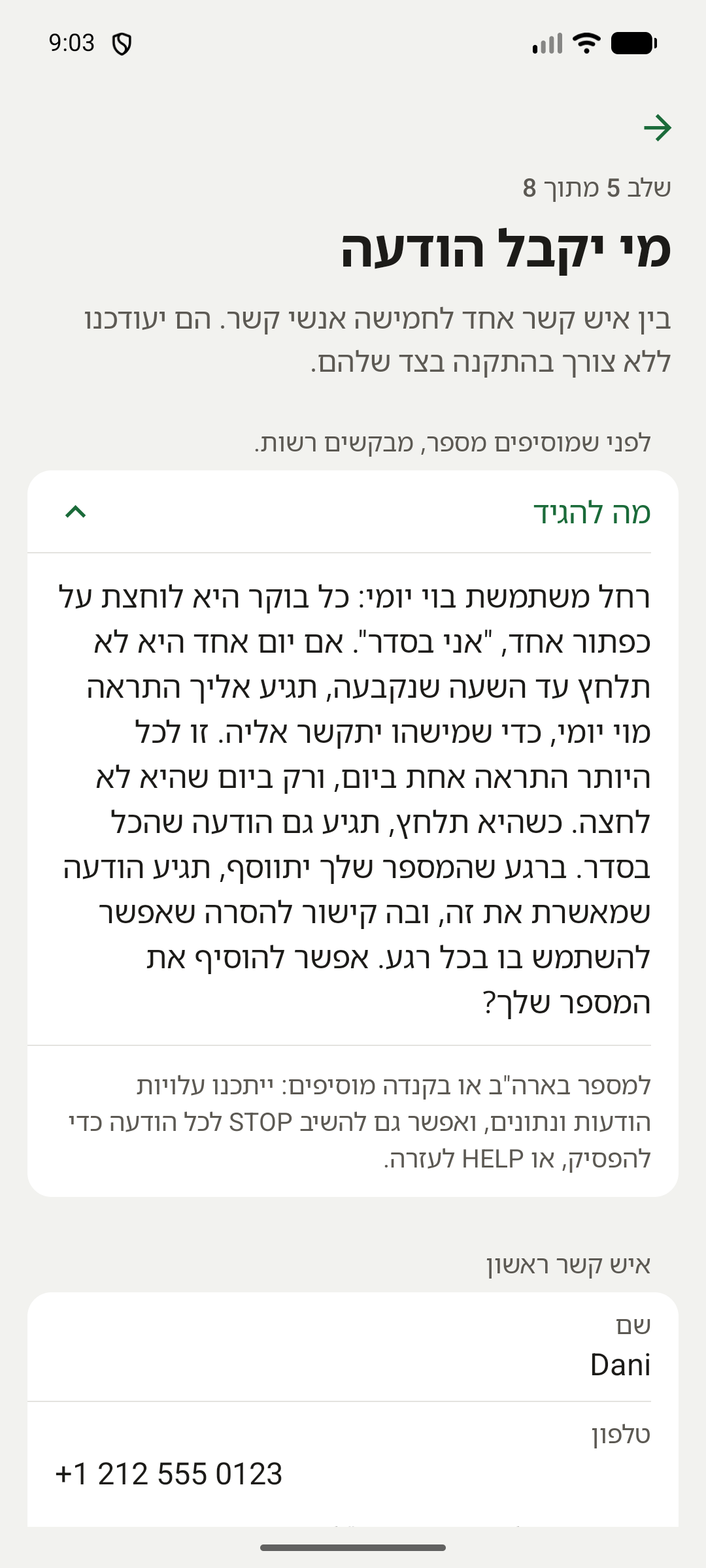
The family member asks each relative, in person or by phone, before typing their number. The app shows these words at the step where contacts are added, as soon as a number in the United States or Canada is typed, with the parent's name and grammatical gender filled in. Only numbers in the US and Canada get messages from this toll-free number; for every number, the same step says to ask for permission first. The app is in Hebrew (or Russian or Arabic); this is the Hebrew version for a mother named Rachel, with an English translation.
2. What the conversation sounds like
Dan is setting up ViYomi on his mother Rachel's phone, and calls his sister Sarah in New York:
Dan: "Mom uses ViYomi now: every morning she presses one button, 'I'm OK'. If one day she doesn't press it by the set time, you'll get an alert from ViYomi, so that someone can call her. That's at most one alert a day, and only on a day she didn't press. When she does press, you'll also get a message that all is well. As soon as your number is added, you'll get a text confirming it, with a link to remove your number that you can use at any time. Message and data rates may apply, and you can also reply STOP to any message to stop, or HELP for help. May I add your number?"
Sarah: "Yes, add me."
Dan types Sarah's name and number into the contacts step and saves. ViYomi texts Sarah the confirmation in section 4 at once. Had Sarah said no, Dan would not have entered her number, and ViYomi would never have it.
3. Where the app shows the script
On the parent's phone, in the step where contacts are added, both in the setup wizard and later in the settings. The line that says to ask for permission first is always there. Once a number in the US or Canada is typed, a button under it, "What to say", opens the script.
4. The confirmation text
The moment a number is saved, it receives this message and nothing else. A number in the US or Canada also gets the English line with the frequency, the rates disclaimer and the keywords:
After that, a recipient hears from ViYomi only on a day the parent misses the check-in: one alert, and a short "all clear" once the parent presses.
5. How consent is recorded
A number reaches ViYomi only when the family member types it into the app, after the relative agreed. The moment it is saved, the server sends the confirmation text above and writes it to the message log: the recipient's number, which message it was, when it was sent, and the SMS provider's message ID. The log is kept for 90 days. The contact stays on the family's list until the family removes it or the recipient opts out. An opt-out is recorded with the contact, and from then on nothing is sent to that number.
6. How a recipient stops the messages
- The link in the confirmation text. It opens a page that names the parent and asks for confirmation, and one tap removes the number. It keeps working for as long as the number is on the list. The confirmation step exists so that automatic link scanners cannot remove someone by accident. Open a copy of the page as a recipient sees it.
- STOP. In the US and Canada, replying STOP to any message stops all texts from our number at once. HELP asks for help.
- Email. A request to viyomi@app4everyone.com is honoured the same way.
What is never sent
- No marketing, promotions, offers or newsletters.
- No messages to anyone who did not agree to be a contact for a specific parent.
- No more than one alert per day per family, and on most days nothing at all.